
Weblooks Writer review (2026): what we tested, and the WordPress connection we could not complete
Weblooks Writer is a hosted AI writing service with a free WordPress connector plugin, sold by Weblooks GmbH in Switzerland. It proposes topics from your site, drafts articles, offers prompt-based section revisions, runs a deterministic quality check, and can deliver drafts or publish automatically to one connected WordPress site. We spent a session inside a live account, read the plugin's source, and installed it on a separate WordPress install. The editorial tools worked. The WordPress connection did not — and the reason is an account rule, not a bug. This review separates those two findings very carefully, because most "AI writer reviews" blur them together.
Bottom line, before the detail
On the evidence we collected, the writing workspace is coherent and unusually cautious in its claims: it says "an article allowance is not a publishing target", it refuses to promise rankings or traffic, and it warns that more articles do not automatically mean better rankings. We generated a proposed section revision, ran the quality review, and produced distribution drafts. All three produced visible, inspectable output.
We also installed the WordPress plugin (version 0.3.22) on a live WordPress site and confirmed that its REST namespace became active. Pairing that site to the account failed with an explicit server message: "Connect the same website used for your sample." The account's site record points at a domain that is not that WordPress site. Because the pairing step is a prerequisite for draft delivery, we did not test WordPress draft sync, automatic publishing, or the article's behaviour in a WordPress editor. Anyone claiming a complete end-to-end Weblooks review needs that step to have worked. Ours did not.
At USD 39/month for 31 articles (about $1.26 each) or USD 79/month for 100 (about $0.79 each), it sits in the middle of the market on price per article but is unusually narrow on scope: one WordPress website, two AI improvements per article, and no multi-site or team features in either published plan. That is a deliberate design choice, and for a single-site publisher it may be the right one — if the connection works.
Editorial status: how this review came about
Weblooks GmbH contacted our contact page, which invites review requests and states that we do not accept payment for reviews, ratings or coverage. The message offered independent testing access and, separately and optionally, an affiliate programme: 20% of qualifying collected subscription revenue for a referred customer's first 12 months from their first paid invoice, after a 30-day hold and a USD 25 cleared-commission minimum, with attribution recorded at account signup rather than by cookie window. The message explicitly said it was not requesting a paid review or a particular rating.
We accepted the testing access. We have not accepted the affiliate programme terms, we have no affiliate link or code, and no commercial relationship exists at the time of writing. No Weblooks link in this article is a referral link. If a relationship is ever agreed, it will be disclosed on this page above the text, and it will not change the findings below.
For clarity about sequence: the testing invitation and the optional affiliate offer arrived in the same message, before testing began. Our affiliate disclosure describes our usual practice of completing testing before any commercial discussion; this review does not follow that sequence, so we are stating it plainly. We accepted testing access only, no commercial relationship exists at the time of writing, and the findings below include the steps that failed as well as those that worked.
What the product actually is
There are two pieces, and conflating them causes most of the confusion:
- A hosted service at
writer.weblooks.ch, operated by Weblooks GmbH (Roosstrasse 53, 8832 Wollerau, Switzerland). This is where the account, topics, articles, credits, schedule and billing live. The plugin's own readme states the hosted service uses Anthropic for AI processing, and names Stripe, Resend, Cyon and Cloudflare as other infrastructure providers. - A free WordPress plugin, listed on WordPress.org as
weblooks-writer, version 0.3.22 at the time of testing, requiring WordPress 6.2+ and PHP 7.4+. The plugin is free; the hosted service is paid after the free sample.
There is also a standalone mode, described on the public pricing page: you can create an article from an approved brief, your profile and supplied sources without connecting a website, then export HTML, Markdown or JSON. Standalone does not publish automatically, shares the same single free sample as the WordPress workflow, and carries a "limited introductory capacity" that may pause — the page explicitly says a subscription does not remove that temporary limit. We did not test standalone generation in this session; our account already contained a ready article.
A practical note on addresses: the email signature and some links point at weblooks.com / weblooks.ch, but the working account entry point and the plugin's configured service URL are https://writer.weblooks.ch. We could not reach the former as a login entry point from our test environment; the latter returned 200 throughout. If you are given an account, use the URL that the service actually serves.
How we tested
Scope note — which website this review covers. This review is published on WorkStackReview, our main site. It is a static site with no WordPress installation, so the connector plugin cannot be installed here. The test account supplied by the vendor was provisioned against a different site, and the plugin was exercised on a separate WordPress installation; neither is the site you are reading, and we do not name them here. Every measurement below comes from that supplied account and that separate install. We have not relabelled any of it as a test of WorkStackReview, and the "same website" pairing rule that blocked WordPress delivery is reported as a limitation, not as a result.
We used a provided test account with internal access and 99 article credits, on 12 November 2026, in a desktop browser. Every significant step was captured to a dated screenshot and, where useful, a DOM snapshot; the full evidence index is at the end of this article. We did not buy a plan, change the account password, delete or overwrite the existing article, publish anything, or connect a payment method.
Separately, we downloaded the plugin ZIP from WordPress.org and read its PHP and JavaScript source before installing anything. We then installed and activated it on a separate WordPress installation over FTP using a short-lived one-shot PHP helper that was deleted immediately afterwards (verified 404 after deletion). We recorded the plugin's REST health endpoint before and after activation. Cache-bypass query strings were necessary because the site runs LiteSpeed Cache, which had cached the pre-install 404.
We are being explicit about the boundary: this is one session, one account, one pre-existing article, no paid plan, no successful WordPress pairing. Everything below is either something we saw happen, something we read in the vendor's own pages or source, or something we marked as unverified. Nothing is inferred from marketing copy.
Test 1 — Workspace and allowance
The Overview opened with a workspace named for a site that is not this one (name withheld here), a badge reading 99 ARTICLE CREDITS, and two counters: 8 Useful topics ready to explore and 1 Articles in your workspace. A line of persistent copy on every tab said "Internal Weblooks access · no subscription or card required. Each website has its own article allowance." That caveat matters: our numbers are an internal test allowance, not what a paying customer sees.
The authenticated account state endpoint showed the same shape from the other side: one site record, nine topics (eight planned, one drafted), one article with status ready, and one revision with status ready. Google Search Console was not_connected and the site record itself was connected: false.
Test 2 — The existing article and its metadata
The Content tab headed "Your content." with the subtitle "Publish a ready article now, send it to WordPress drafts, or keep your schedule." It listed exactly one article:
- Title: Can a Password Manager's Vendor Reset Your Master Password? Nine Questions to Settle First
- Status:
READY - Date:
2026/11/12 00:17:11, with a note "Created · not scheduled" - Two next-step buttons: Open article and Connect your website
The article detail view exposed a metadata area, a featured-image section, and an approval area. We did not overwrite the original article, in line with the test brief, and we did not approve or publish it. The topic itself is worth noting as a quality signal: it is a question-shaped, evidence-oriented piece about vendor access to a master password, which is a more substantive brief than the generic "best tools" list that bulk writers usually produce. That is an observation about this one article, not a claim about the generator's average output.
Test 3 — Improve with AI
We entered a short improvement prompt and ran Improve with AI. The service returned a Proposed change with visible revision text (including a passage headed "Questions 4–5: what the vendor can still see") and two decisions: Accept changes and Keep original. The interface also displayed "1 of 2 included improvements remaining", which matches the published rule that each article includes two successfully produced improvement proposals — including proposals you reject.
This is the feature we would most want to judge over time, and our session cannot. One proposal is enough to confirm the control works and that the output is presented as a reviewable diff rather than silently rewriting the draft. It is not enough to judge whether the edits are good, whether they preserve facts, or whether the second proposal differs meaningfully from the first. We kept the original rather than accepting, so the source article is unchanged.
Test 4 — Review quality (the previously reported dead click)
Our test brief specifically asked us to check Review quality because a previous attempt had produced no visible response, and warned us not to assume the cause. In this session the feature worked. Clicking it produced a panel headed Quality review · Version 1, a status of needs_review, and a source label deterministic-editorial-checks. Three warnings were listed: title-length, description-length and approval, each with Accept recommendation and Reject recommendation controls.
We did not reproduce the earlier no-response behaviour, so we cannot diagnose it. What we can say is that on 12 November, with this account and this article, the review ran and returned structured results. The label "deterministic" is consistent with what we saw: these look like rule-based checks on title length, description length and approval state, not a subjective AI grading of prose. That is a narrower thing than "quality review" might suggest, and buyers should read it that way. A title-length warning is not an assessment of whether the article is accurate.
Test 5 — Distribution drafts
Distribution drafts produced a structured record rather than prose, and it is one of the more informative screens in the product. It showed:
article Id: article_034b3ae8d761a273ebbbace72476934farticle Version: 1,status: draft_suggestionscanonical Url: Unknown,canonical Basis: unavailable- The explicit notice: "Distribution suggestions are drafts only; nothing is sent."
That last line is the honest one. "Distribution" here means suggested distribution copy, not delivery. The unknown / unavailable canonical fields also make sense in our state: with no connected site, the service has no canonical URL to reason about. We treat this as a correctly reported limitation, not a defect.
Test 6 — Publishing schedule
The Publishing tab is headed "A schedule with a reason." and its preferences were pre-set to Asia/Shanghai, 1 article on selected days, first article hour 9, and days Mon / Wed / Fri checked. The explanatory copy is unusually direct: "Choose a pace supported by useful, distinct topics. Select fewer days for a lower frequency. More articles do not automatically mean better rankings; when topics overlap, we will ask for information or suggest slowing down."
The public pricing page repeats this as policy: "An article allowance is not a publishing target", and if suitable topics run out, Writer asks for more information or a lower frequency rather than filling the schedule. We did not save a schedule or wait for the seven-day rolling window to generate anything, so the scheduling behaviour itself is untested. But the default of one article on three days a week — against a 31-article monthly allowance — is a genuinely conservative default, and it is worth crediting. Most tools in this category sell volume and quietly equate it with results.
An "Upcoming topics" card said topics are generated within a rolling seven-day window and the available allowance, and that planning future topics does not spend credits. Our account state showed eight planned topics and one drafted, consistent with that description.
Test 7 — Research and Visibility
Two tabs cover search data, and both are more limited than "SEO tool" would imply:
- Research and briefs describes "Google Search Console research" from first-party observations — clicks, impressions, CTR and average position, explicitly "not market-wide keyword search volume". It offers Import saved Google query examples and a link to manage Search Console in Visibility. The page states that Google Keyword Planner integration is not enabled, that only partial query examples for tracked pages are available, and that importing uses the saved report without contacting Google or granting new access. A second card, Optional paid research · DataForSEO, describes provider estimates and search snapshots, says missing metrics remain unknown, and notes paid-ad competition is not SEO difficulty.
- Search visibility offers Connect Google Search Console with read-only access, says Writer cannot change Google settings or guarantee indexing, and — with no data imported — states "Search figures have not been imported yet. This is different from zero clicks." Its improvement section says content review starts at 20 recorded impressions over 28 days and title review at 100 impressions, and that sparse data never triggers a poor-CTR diagnosis.
We did not connect a Google account. That is a scope decision, not a failure: connecting Search Console would have granted read access to another property and was outside our test brief. What we can confirm is that the product does not invent numbers when there are none — "not imported" is shown instead of "0". That is a small but real piece of editorial honesty, and it is the same posture as the "No ranking or traffic guarantees" line that appears in the site footer and the pricing page.
Test 8 — Profile / voice
The Profile tab, headed "Make sure we understand you.", holds the facts the service says guide every article. In our account, Website or business name held a site that is not this one (name withheld here), Article language was English, and the audience field described consumers and small-team buyers weighing privacy and security tools. A longer "What your business does" field described a reader-supported editorial site that evaluates privacy tools by reading vendor-published policies, audit scope pages and documentation. There is helper copy noting the language setting chooses the target article language and regional variant, does not change the dashboard locale, and that translated output should be reviewed before publishing.
We did not edit the profile. This is the input side of the workflow; we cannot judge how strongly it shapes output from a single pre-existing article.
Test 9 — Billing and Account
The Billing tab showed the Daily card at USD 39 / month with bullets "31 articles each month", "1 WordPress website", "2 AI improvements per article", "Drafts or automatic publishing", "Manual editing in WordPress", and a Choose Daily button. Footer copy: "Renews monthly. Cancel future renewals in Billing. Prices include applicable taxes. Monthly credits expire; capacity is not a publishing target." Scrolling down showed the Growth card at 100 articles each month with otherwise identical bullets, and the line "Your free sample and accepted improvements are kept when you subscribe. No restart, no lost edits." There was also a Refresh account status button and the recurring "Internal Weblooks access · no subscription or card required" notice. We did not click either plan button or enter payment details.
The Account tab, headed "Your account and data.", offers Download my data — "website profile, articles, revisions, schedule and account records in a JSON file", with "Connection secrets and sign-in credentials are excluded" — behind a current-password field, plus a Delete account section. It says deleting stops new writing and delivery, cancels the subscription immediately and removes hosted drafts, while posts and media already delivered to WordPress stay on your website. We did not download or delete anything. The exclusion of connection secrets from the export is the right default.
Test 10 — Installing and activating the WordPress plugin
This is the part of the test we can report most concretely, because it produced machine-readable before/after evidence rather than a visual impression.
We downloaded the WordPress.org ZIP (31 entries) and read the source first. The main file defines WEBLWR_VERSION = '0.3.22' and loads includes/connector.php. The connector registers REST routes under the wordpress-writer/v1 namespace: /health, /post-status, /publish, /deliver, /sources, /allowance, /revise, /revision, plus /dashboard and /dashboard-connect from the dashboard module. Activation creates two database tables, wp_weblwr_receipts and wp_weblwr_nonces.
We then uploaded the plugin directory over FTP and activated it with a one-shot helper. The helper reported: plugin_file: present, activate: ok, active: true, version: 0.3.22, home_url: (a separate WordPress installation; domain withheld), paired: false. The helper was deleted and its URL returned 404 afterwards.
The health endpoint told the same story from outside. Before installation, /wp-json/wordpress-writer/v1/health returned 404 rest_no_route. After activation, with a cache-bypass query, it returned 401 weblwr_signature — "Invalid signature." The site's REST index gained the wordpress-writer/v1 namespace, and the namespace index listed the routes above. A 401 here is the expected response for an unpaired plugin: the signature check rejects requests because no connection secret exists. It is evidence that the plugin is live and gated, not that it is broken.
We also confirmed that the site's wp-login.php, wp-admin/ and REST index were reachable (200) and that a second WordPress property was also reachable, before choosing one for the install. Both had the plugin's health endpoint at 404 beforehand.
Test 11 — The connection we could not complete
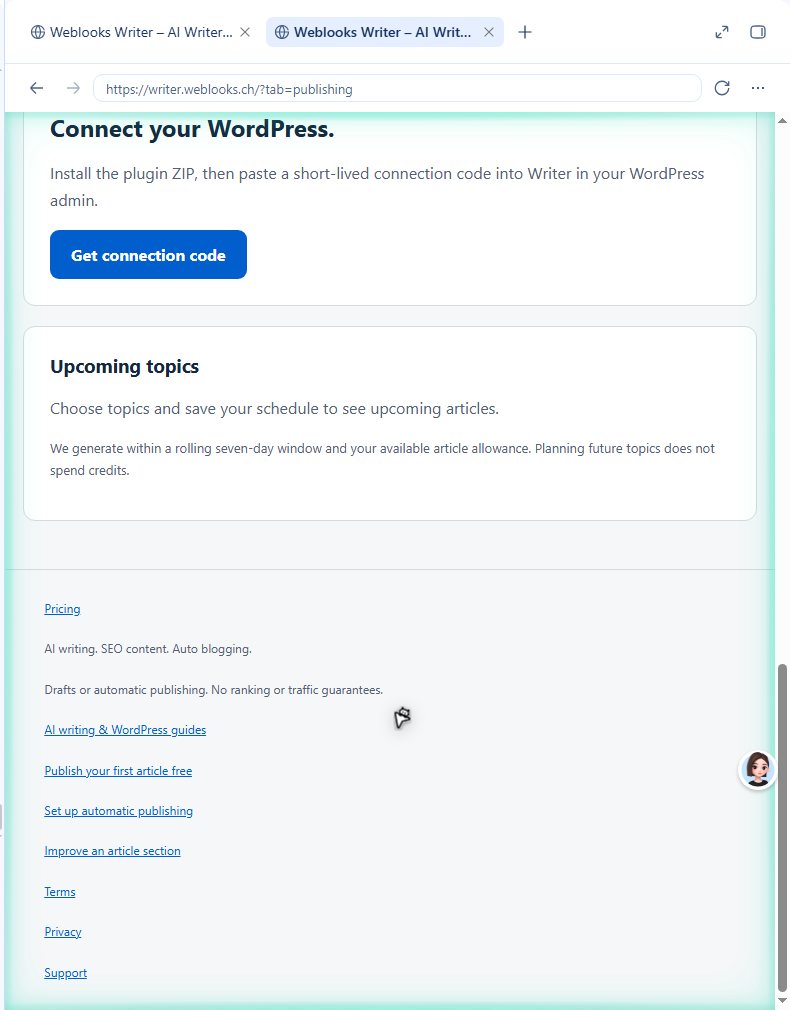
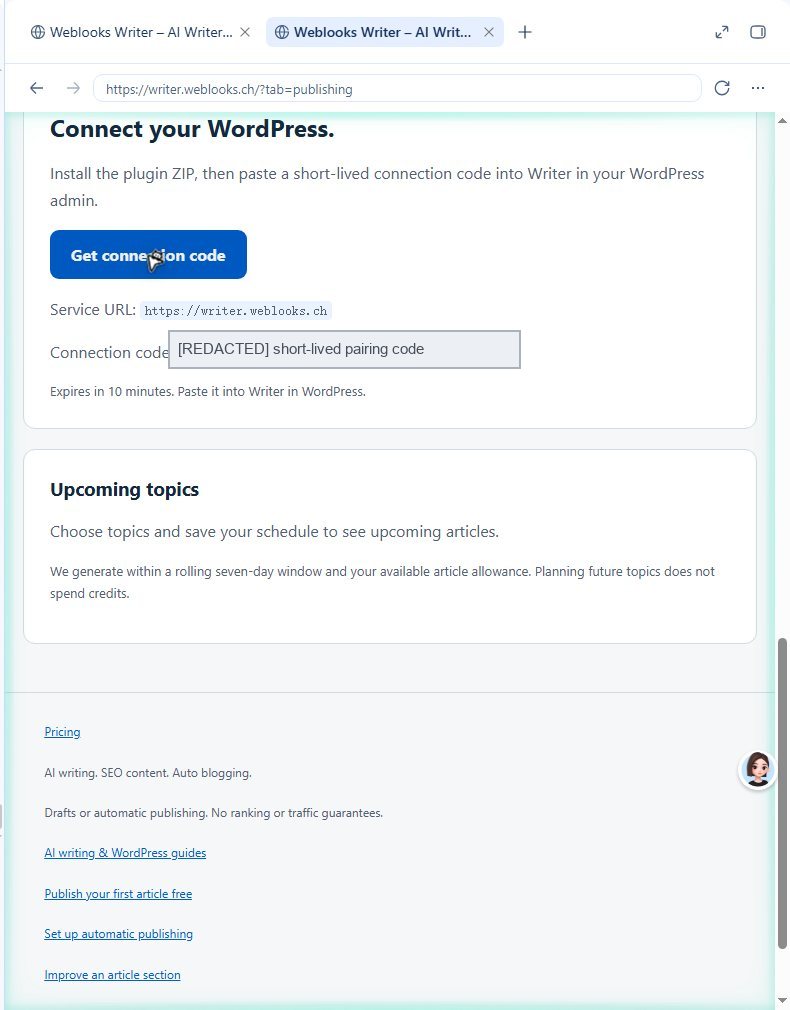
The Publishing tab's connection card reads: "Install the plugin ZIP, then paste a short-lived connection code into Writer in your WordPress admin." The Get connection code button generated a 32-character code, a Service URL of https://writer.weblooks.ch, and the note "Expires in 10 minutes. Paste it into Writer in WordPress." We captured the screen and then redacted the code value in the deliverable copy — the code is a short-lived credential and does not belong in a published article.
We used the code to attempt the pairing the plugin itself implements: a server-side POST to /api/connector/pair carrying the token, the site's home_url() and a freshly generated secret. The service answered HTTP 400 with:
{"error":"Connect the same website used for your sample."}
We then read the authenticated account state to find out which website that is. The single site record in the account pointed at a domain that is not this site (URL withheld here) with connected: false, and five public page URLs already imported from that domain. That domain is a static site — it has no WordPress installation and cannot host the connector plugin. The WordPress site we had just activated the plugin on is a different domain. The service therefore refused the pairing.
What this means, and what it does not. It means that with this particular test account, WordPress connection and everything downstream of it were unreachable. It does not mean Weblooks Writer's WordPress integration is broken in general: we did not have an account whose sample site was a WordPress install, so we never exercised the successful path. The most likely reading is an account-provisioning constraint — the free sample is tied to one website, and the service enforces that the connector belongs to the same site. We did not attempt to work around it by misreporting the site URL; that would have produced a false "success" and a misleading review.
This also explains something a buyer should check before subscribing: one WordPress website per plan is not just a billing limit, it appears to be an account-level binding. If you run several sites, or your sample was created against a site you later change, the connection step is where you will find out.
Test 12 — Draft delivery and publishing: not tested
We want to be unambiguous about this, because it is the most common place a review quietly overstates itself.
We did not send an article to WordPress. We did not create a draft. We did not check a title, body, image, formatting or links inside a WordPress editor. We did not enable or observe automatic publishing, and we did not publish anything. Our test brief prohibited publishing, and the failed pairing made draft delivery impossible anyway. Consequently, we cannot say whether the delivered HTML is clean, whether featured images arrive, whether links survive, or whether the WordPress editor experience is usable. Those are exactly the things we would test next with a correctly provisioned account.
Likewise, we did not test article generation from scratch, title generation, image generation, long-form editing, scheduling over time, or any effect on rankings or traffic. The first article in the workspace already existed when we arrived.
What the plugin can do once it is paired
Although we could not exercise the delivery path, the source tells us what it would have been authorised to do, and that is relevant to any security review before you install it on a production site.
- Signed requests. Incoming calls are checked with an HMAC-SHA256 signature over method, route, timestamp, nonce and a SHA-256 hash of the body. The timestamp must be within 300 seconds, the nonce must be 32 hex characters and the signature 64, and a nonce ledger table rejects replays for 10 minutes. A temporary pairing secret may prove plugin ownership through
/health, but the code comment is explicit that it "may prove plugin ownership, but never authorize content changes" — any other route requires a stored connection secret. - Delivery.
/delivervalidates the article ID pattern, accepts onlydraftorpublish, caps content at 200,000 characters, checks that the configured author still hasedit_posts(andpublish_postsfor publishing), and uses a unique receipt row to prevent two concurrent requests creating duplicate posts. That is a reasonable anti-duplication design. - Site content export.
/sourcesreturns published, non-password-protected posts and pages, 20 per page, with title, URL, up to 14,000 characters of plain text, up to 28,000 characters of HTML, and a SHA-256 checksum. The plugin's own UI says connecting shares only published pages and posts, and that no orders, customer records or private pages are imported. That matches the query we read. If you have content that is public but sensitive, it is still shared. - AI revisions inside WordPress.
/allowance,/reviseand/revisionare gated by an editor permission check that requires a draft/pending/auto-draft post,edit_postcapability, and a linked Writer article ID. The allowance endpoint reports remaining improvements (two per article). - Deactivation. Deactivating calls
/api/connector/disconnectand deletes the local connection option. The plugin readme also declares an AI-origin notice for generated content.
None of that is a hands-on result; it is a source reading, and we have labelled it as such. It does tell you that connecting the service grants a third party a signed, authenticated path to create drafts — or published posts, if you enable automatic publishing — on your site. That is the actual permission trade, and it deserves a deliberate decision rather than a click-through.
Pricing, as published and as shown in the account

| Free sample | Daily | Growth | |
|---|---|---|---|
| Price | USD 0, no card | USD 39 / month | USD 79 / month |
| Articles | One eligible article | 31 / month | 100 / month |
| WordPress websites | Not required for standalone | 1 | 1 |
| AI improvements | Two successfully produced proposals | 2 per article | 2 per article |
| Delivery | Draft or publish, or standalone export | Drafts or automatic publishing | Drafts or automatic publishing |
| Our arithmetic: price per article | — | ≈ $1.26 | ≈ $0.79 |
Terms worth reading before the numbers: the free sample is one per eligible verified customer, shared across standalone and WordPress, includes two successfully produced improvement proposals (including rejected ones; failed requests do not count), and stays free if you later subscribe. Monthly credits expire at the end of their allowance period — unused articles do not roll over. Planning future topics does not spend credits. Prices include applicable taxes, renew monthly, and future renewals can be cancelled in Billing. The page states plainly: "No ranking or traffic guarantees."
One caveat we would want clarified before paying: the pricing page says standalone AI has "limited introductory capacity" that may pause, and that a subscription does not remove this temporary capacity limit. It also says existing WordPress workflows are unchanged. If you are buying mainly for standalone export, read that sentence twice; if you are buying for WordPress delivery, it appears not to apply.
How that compares with five alternatives
We read the public pricing pages of five other tools on the same day. These are not equivalent products — some bill by article, some by words, some by seat, and one sells software you run yourself — so the table is a price-structure comparison, not a ranking.
| Tool | Entry price (as published) | What the meter is | Our arithmetic |
|---|---|---|---|
| Weblooks Writer | USD 39/mo (Daily); USD 79/mo (Growth) | 31 / 100 articles per month, 1 WP site | $1.26 / $0.79 per article |
| SEOWriting | Starter $14/mo (billed $168/year); Professional $59/mo ($708/yr); Pro Plus 1 $119/mo; Pro Plus 2 $230/mo | Up to 50 / 250 / 500 / 1000 articles; 3 free articles, no card | $0.28 / $0.24 / $0.24 / $0.23 per article at the yearly-billed rates |
| Koala AI | Starter $25/mo; Professional $49/mo; Boost $99/mo (annual billing saves 20%) | 45,000 / 100,000 / 250,000 words plus 500 / 1,000 / 2,500 credits; free one-time 5,000 words | Priced by words, not articles. At an assumed 1,500 words per article, Starter ≈ $0.83/article — an illustration, not a published figure |
| Byword | Starter $83/mo; Standard $249/mo; Scale $833/mo | 25 / 80 / 300 articles; extra articles $3.50 / $3.00 / $2.50 | $3.32 / $3.11 / $2.78 per article (the vendor prints these figures itself) |
| Jasper | Pro $69/month/seat monthly, $59/month/seat yearly; Business custom | Seats and platform features, 1 seat on Pro, no article allowance | No per-article price exists; it is a general marketing platform, not an article quota |
| ZimmWriter | [VERIFY] No licence price published on the page we checked; the vendor describes it as "less than a dollar a day" | Windows desktop software, bring-your-own API keys, no monthly word cap; optional ScrapeOwl $5/mo and Runware $10 ≈ 5,250 images | Cost is your own API usage, not a subscription allowance |
Two inconsistencies are worth flagging rather than smoothing over. Byword's page title says "Plans Starting at $99/month" while its own table shows Starter at $83/mo with "Save $198/yr" — we reproduced the table, not the title. SEOWriting's displayed figures are the yearly-billed monthly equivalents ($14/mo billed $168/year, and so on); we could not confirm from that page what the month-to-month price is. Neither affects our Weblooks figures, but both are a reminder that a comparison table is only as good as the toggle state it was read in.
On pure per-article arithmetic, Weblooks' Growth plan ($0.79) undercuts Byword's cheapest tier ($3.32) by roughly four times, and sits above SEOWriting's yearly-billed Starter ($0.28) by roughly three times. But those three products are not selling the same thing. SEOWriting and Byword sell bulk generation; Weblooks sells a paced, one-site workflow with a topic pipeline, a quality gate and a two-revision budget per article. Koala sells words plus an SEO agent; Jasper sells a marketing platform with seats; ZimmWriter sells desktop software and you buy the tokens yourself. If you want 500 articles a month, Weblooks is structurally the wrong tool even at a lower unit price. If you want one considered article three times a week on one site, the bulk tools are optimised for a problem you do not have.
The more useful comparison is philosophical. Most of this market sells capacity and leaves the publishing decision to you; Weblooks sells capacity while actively telling you not to use all of it. Whether that is refreshing or presumptuous depends on how much you trust a vendor to pace your editorial calendar.
Security and data handling, in brief
Before installing the connector on a production site, the practical checklist is: the plugin creates two database tables; it exposes signed REST routes that can create drafts or published posts; /sources shares text and HTML of your published posts and pages with the hosted service; the service uses Anthropic for AI processing and names Stripe, Resend, Cyon and Cloudflare in its privacy declarations; signing uses HMAC-SHA256 with a five-minute window and replay protection; deactivation calls a disconnect endpoint and removes the stored connection. The dashboard module also notes that "Public website content is shared when you import or connect your site. AI edits send the text and instructions you provide", and advises not to include confidential information in prompts. We would add one of our own: avoid enabling automatic publishing until you have reviewed several delivered drafts manually.
Pros, based on what we actually saw
- Reviewable AI edits. The improvement arrives as a proposed change with explicit accept/keep controls and a visible remaining-allowance counter, rather than silently rewriting the draft.
- Quality checks are labelled honestly. "Deterministic editorial checks" on title length, description length and approval state — not a vague AI score presented as a judgement of accuracy.
- No invented metrics. "Search figures have not been imported yet. This is different from zero clicks", and "canonical Url: Unknown / canonical Basis: unavailable" when the data genuinely is not there.
- Conservative publishing defaults. One article on three days a week against a 31-article allowance, with explicit copy refusing to equate volume with rankings.
- Clear disclosure posture. No ranking or traffic guarantees appears in the pricing page, the site footer and the Publishing tab. The affiliate terms shown to us say reviews remain independent and affiliate links must be disclosed.
- Reasonable plugin engineering on paper. Signed requests, timestamp and nonce validation, replay ledger, capability checks, and an idempotent delivery receipt.
- Account export excludes secrets. The data download explicitly omits connection secrets and sign-in credentials.
Cons and limitations
- One WordPress website per plan, and apparently per account. The pairing rule we hit suggests site binding is enforced at the service level, which matters for anyone managing more than one property.
- Only two AI improvements per article. Rejected proposals count. For heavily edited pieces that is a tight budget compared with tools offering an AI chat inside the editor.
- Unused monthly credits expire. There is no rollover, and the free sample is shared between standalone and WordPress.
- Research is narrow. First-party Search Console examples, no Keyword Planner integration by default, and optional paid DataForSEO estimates. This is not a keyword research suite.
- "Quality review" is rules-based. Useful for metadata hygiene; not an assessment of factual accuracy.
- Connection friction is real. Installing a plugin ZIP, generating a 10-minute code and pasting it into WordPress admin is more manual than the one-click OAuth flows many competitors use. Our attempt failed at the final step.
- Standalone capacity is explicitly temporary. The vendor says it may pause and that subscribing does not lift the limit.
- Entry points are confusing. The signature references weblooks.com / weblooks.ch while the working service is writer.weblooks.ch.
Who should consider it, and who should skip it
Consider it if you run one WordPress site, publish a few considered articles a week, want a topic pipeline and a metadata quality gate, and are comfortable with a paced workflow rather than bulk output. The USD 39 Daily plan is the sensible trial; Growth only makes sense if you will genuinely use close to 100 articles, which the vendor itself discourages.
Skip it if you manage multiple sites or client sites, need hundreds of articles a month, want deep keyword research, want unlimited AI revisions in the editor, or run a static site with no WordPress install. Also skip it if your priority is verifying end-to-end WordPress delivery before committing — based on our session, you should confirm that your account's sample site is the WordPress domain you intend to connect before you pay.
What we would ask Weblooks next
- Can an account whose free sample was created against a non-WordPress domain be re-provisioned, or is a new account required to test the WordPress connector?
- What exactly happens when the 31- or 100-article allowance is exhausted mid-month — does scheduling pause, can extra articles be bought, and at what price?
- Do rejected improvement proposals really consume the two-per-article budget in all cases, and what counts as a "failed request"?
- Can automatic publishing be disabled at the account level rather than per site, and is there an approval-only mode?
- What is the standalone capacity limit, and when does it lift?
Evidence captured in this session
We saved one screenshot per significant step. The connection-code screens below are redacted; the short-lived code itself is not reproduced anywhere in this article or in the accompanying report. Captured but not reproduced here: window-focus calibration frames and two failed continuous-capture runs, retained only as process records.
| Area | Evidence file | What it shows |
|---|---|---|
| Workspace | 10-overview-workspace.jpg, 30-tab-overview.jpg | workspace name withheld, 99 credits, 8 topics, 1 article |
| Content | 11-content-list.jpg, 38-tab-content-recapture.jpg, 12-article-open.jpg | READY article, date, "Connect your website", article detail |
| Improve with AI | 13-improve-ai-proposed-change.jpg | Proposed change, accept/keep, remaining improvements |
| Review quality | 14-review-quality.jpg, 15-review-quality-warnings.jpg | Version 1, needs_review, three warnings |
| Metadata / image / approval | 16-metadata-featured-image.jpg, 17-image-and-approval.jpg | Metadata, featured image and approval areas |
| Distribution drafts | 18-distribution-drafts.jpg, 19-distribution-drafts-detail.jpg, 20-distribution-drafts-text.jpg | draft_suggestions, canonical Unknown, "nothing is sent" |
| Publishing | 22-publishing-schedule.jpg, 23-publishing-scroll1.jpg, 24-publishing-wp-connect.jpg, 35-tab-publishing.jpg | Schedule defaults, WordPress connection card |
| Connection code (redacted) | 25-connection-code-REDACTED.jpg, 27-connection-code-fresh-REDACTED.jpg | Service URL and 10-minute expiry; code masked |
| Research / Visibility / Profile | 39-tab-research-recapture.jpg, 33-tab-visibility.jpg, 40-tab-profile-recapture.jpg | Search Console research, read-only GSC, profile fields |
| Billing / Account | 36-tab-billing.jpg, 41-tab-billing-growth.jpg, 37-tab-account.jpg | USD 39 Daily, Growth, data export and deletion |
| Plugin install & pairing (machine-readable) | wp-install-result.json, wp-pair-result.json, api-state-summary.json | 404 → 401 health change, activation result, HTTP 400 pairing error, account site binding |
Two redacted screens are shown below as they were captured.
Sources
- Weblooks Writer — public pricing page (read 12 November 2026)
- Weblooks Writer — affiliate programme terms (version dated 9 November 2026)
- WordPress.org — weblooks-writer plugin page and the plugin ZIP, version 0.3.22, source read locally
- Koala AI pricing, SEOWriting pricing, Byword pricing, Jasper pricing, ZimmWriter (all read 12 November 2026)
- Our own dated screenshots and machine-readable install / pairing / account-state results listed above
What we cannot verify
We tested one account, one session, one pre-existing article, on 12 November 2026, with internal access and 99 article credits and no paid plan. We did not generate an article from scratch, so headline generation, structure quality, image generation, SEO content quality and long-form editing are unverified. We did not buy a subscription, so checkout, renewal, cancellation, tax handling, what happens when the allowance is exhausted, and whether credits really expire are unverified. We did not connect Search Console, so imported query data, visibility reporting and the improvement thresholds are unverified. We did not edit the profile, so its effect on output is unverified. We did not use standalone mode or its HTML / Markdown / JSON exports. We installed and activated the WordPress plugin and confirmed its REST routes, but pairing failed with an HTTP 400 "Connect the same website used for your sample" error; therefore draft delivery, draft contents, featured images, link handling, formatting inside the WordPress editor, automatic publishing and scheduling over time are all unverified. We did not publish any article generated by Weblooks Writer, and no such test article was placed on any of our sites. We did not test support response times, uptime, or any effect on rankings, indexing or traffic — the vendor does not guarantee any of those and neither do we. Plugin security behaviour was read from source, not exercised end-to-end. Competitor prices were read from public pricing pages on the same date; we hold no paid accounts with those tools, and the two flagged inconsistencies (Byword's page title versus its table, SEOWriting's annual-billing figures) were not resolved with the vendors. ZimmWriter's licence price was not visible on the page we checked and is marked [VERIFY]. Finally, the testing invitation and the optional affiliate offer arrived together, before testing began; that sequence is disclosed above rather than claimed otherwise.